
Most people who search for Teen Patti Master login are stuck on one small thing – the OTP never arrives, the app says “network error”, or they changed phones and can’t find their old account. I’ve run into all of these myself, so this guide keeps it simple: first the normal login steps, then the fixes that actually work when something goes wrong.
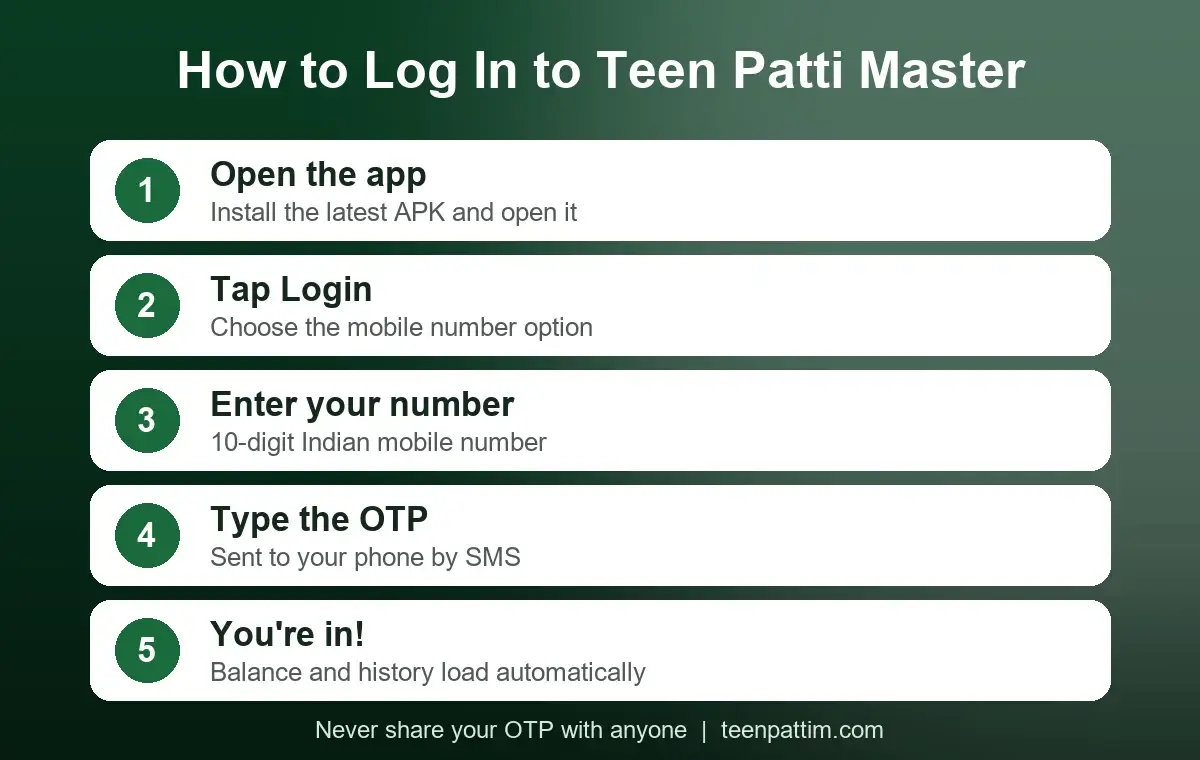
Quick answer – how to log in:
- Install the latest Teen Patti Master APK and open the app.
- Tap Login and choose the mobile number option.
- Enter your 10-digit Indian mobile number.
- Type the OTP you receive by SMS.
- You’re in – your balance and game history load automatically.
Before You Log In – A 30-Second Check
Half of all login problems disappear if you check these four things first:
- Latest version: old APK versions often fail at the login screen after a server update. If the app asks you to update, do it before anything else. You can get the current file from our Teen Patti Master download guide.
- Working SIM: the OTP comes by SMS, so the number must be active and inside your phone (or at least able to receive messages).
- Stable internet: switch between Wi-Fi and mobile data if one of them is slow.
- Age 18+: real-cash card games are only meant for adults.
Teen Patti Master Login With Mobile Number (Step by Step)
This is the method I recommend for everyone, because your account and wallet stay linked to your number and you can recover them on any phone.
Step 1 – Open the app
After installing, open Teen Patti Master. The first screen usually shows a login option. If you see a guest or “play now” button, skip it for now – I’ll explain why below.
Step 2 – Enter your mobile number
Type your number without +91 or a leading zero. Double-check it – a single wrong digit sends the OTP to someone else.
Step 3 – Enter the OTP
The SMS normally arrives within a minute. On many phones the app reads it automatically; if not, copy the code yourself. Never share this code with anyone, including people who say they are “support”.
Step 4 – Set up your profile
On first login you may be asked to choose a name or avatar. After that, the lobby opens and any signup bonus shown in the app is added to your wallet. You can read how the bonus works in the ₹51 bonus guide.
Guest Login vs Mobile Login
Some versions of the app let you start as a guest. It’s quick, but there’s a catch: a guest account lives only on that one phone. Clear the app data, uninstall, or switch phones, and the account – along with any balance – can be gone. If you’ve already started as a guest, look for a “bind” or “link mobile number” option in your profile and connect your number as early as possible.
| Mobile login | Guest login | |
|---|---|---|
| Works on a new phone | Yes | Usually no |
| Account recovery | Via OTP | Very difficult |
| Withdrawals | Supported | Need to link a number first |
How to Log In on a New Phone
Install the app on the new phone, choose mobile login and enter the same number you used before. After the OTP, your old balance and history should appear. If you see an empty new account, you probably used a different number or your old account was a guest account – contact in-app support with your old user ID if you have it.
Teen Patti Master Login Problems and How to Fix Them
OTP not received
- Wait 60 seconds before tapping “resend” – asking repeatedly can lock OTP requests for a while.
- Check that the SIM has network signal and isn’t blocking promotional/transactional SMS (DND settings).
- Restart the phone; it often clears stuck SMS.
- Still nothing after a few tries? Wait 30–60 minutes and try again.
“Network error” or the app keeps loading
- Switch between Wi-Fi and mobile data.
- Turn off any VPN or data-saver app.
- Go to Settings → Apps → Teen Patti Master → Storage and clear the cache (not the data, if you use guest login).
App closes right after login
This is almost always an outdated or broken APK. Uninstall, download the latest file again and reinstall. Your mobile-linked account is safe on the server. Our APK safety guide explains how to check that the file is genuine.
“Account locked” or “account suspended”
Accounts can be restricted for using modified apps, multiple accounts on one device, or suspicious payment activity. Use the Help or Customer Service section inside the app and explain your case with your user ID. Don’t pay anyone on Telegram or WhatsApp who promises to “unlock” an account – that is a common scam.
Logged out after an update
Just log in again with your number and OTP. Nothing is lost if your account was linked to a mobile number.
Keep Your Account Safe
- Never share your OTP, UPI PIN or bank details with anyone.
- Avoid “mod”, “hack” or “unlimited chips” APKs – they are the fastest way to lose an account.
- Only download the app from a source you trust, and check the file before installing.
- Log out if you lend your phone to someone.
Frequently Asked Questions
Is Teen Patti Master login free?
Yes. Creating an account and logging in costs nothing. You only spend money if you decide to add cash to play paid tables.
Can I use one account on two phones?
You can log in on another phone with the same number, but usually only one device stays logged in at a time. Logging in on a new phone will typically sign out the old one.
Is “Teen Patti Mastar” login the same thing?
Yes – “Teen Patti Mastar” is just a common spelling mistake people type when searching. The app and the login steps are exactly the same as described above.
Do I need KYC to log in?
No. Login only needs your mobile number and OTP. KYC is normally asked for later, when you want to withdraw winnings. See the withdrawal guide for details.
I changed my mobile number. How do I get my account back?
If you still have the old SIM, log in with it and look for an option to change the linked number. If the old SIM is gone, contact in-app support with your user ID and any payment receipts that prove the account is yours.
Related Guides
- Teen Patti Master Customer Care – How to Contact Support Safely
- Teen Patti Master Mod APK & Hack – Is It Safe?
- Teen Patti Master Not Working or Not Opening – Easy Fixes
- Teen Patti Master Download – Latest APK Install Guide
- Teen Patti Master ₹51 Bonus – Refer & Earn
- Teen Patti Master Withdrawal Guide
- Teen Patti Master Real or Fake?
- Teen Patti Master FAQ
⬇ Download Teen Patti Master APK
18+ only. Real-cash card games involve financial risk and can be habit-forming. Play for fun, set a budget, and stop if it stops being enjoyable. teenpattim.com is an independent guide and is not the app developer.